Why Job Application Spreadsheets Get Abandoned.
A free job application tracker should show follow-ups and funnel progress, not become another spreadsheet chore. Here is what to track and why.
 By Shivani S, Co-founder, ReachRole
Search for a job application tracker free app and you will find plenty of spreadsheet templates. The usual columns—company, role, date applied, and status—are a sensible beginning. The problem is not the table. The problem is that a passive spreadsheet depends on you remembering to open it after every application.
What is the best way to track job applications without spreadsheets?
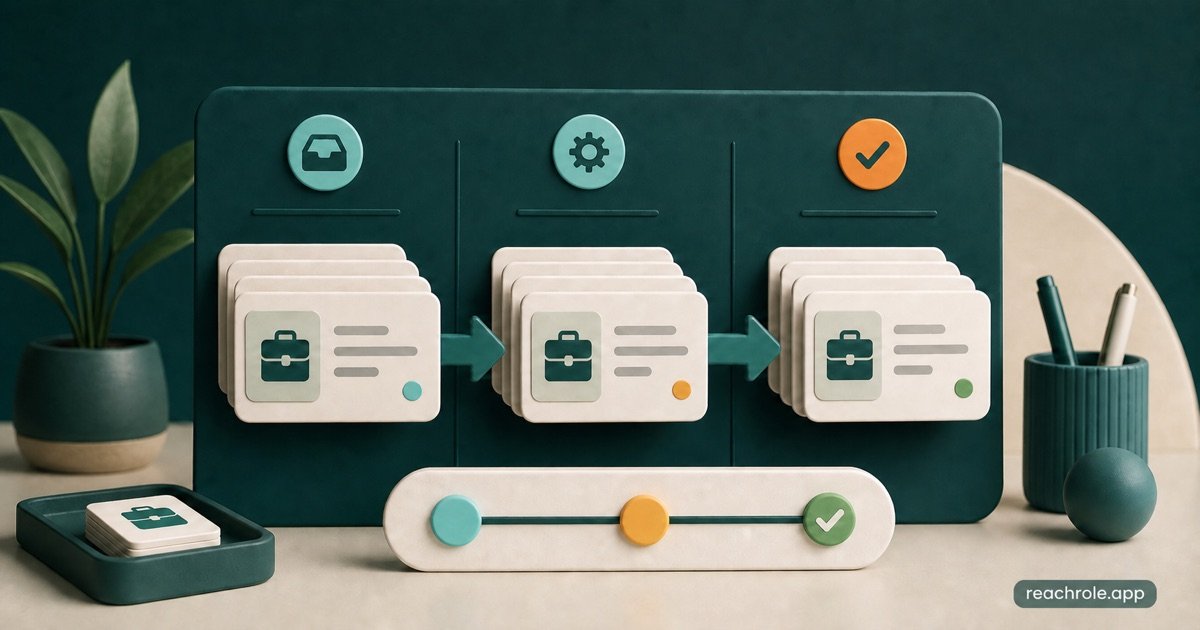
The most effective way to track job applications is using a dedicated status-driven pipeline (Wishlist, Applied, Interviewing, Offer, Rejected) that logs exact resume versions, JD requirements, recruiter contact details, and follow-up deadlines. Dedicated trackers prevent duplicate submissions, ensure timely post-interview follow-ups, and provide data on which resume keywords yield the highest callback conversion.
During an active search, missed updates accumulate quickly. Soon you cannot remember which resume version went to which company, whether a recruiter promised to reply, or when a polite follow-up is due. A useful tracker should reduce that mental load and help you decide what needs attention next.
Use this guide well
Apply the recommendations to one real target role at a time, then keep only the changes you can support in an interview.
Why job application spreadsheets get abandoned
A spreadsheet is separate from the work of applying. You find the role in one place, tailor a resume in another, submit through a portal, then open a fourth tab to log the result. Every extra step is easy to postpone. Once several entries are missing, updating the sheet feels like cleanup rather than progress.
Most templates also record the past without surfacing the future. They show the date applied but do not clearly answer which applications deserve a follow-up today, which interviews are coming up, or which roles have been silent long enough to archive.
What to record for every application
Keep the required fields small enough that logging takes seconds. Company, role, job link, application date, current stage, and next action cover the basics. Add the resume version and cover letter used so you can review the exact documents before an interview.
Notes should capture information you will use later: recruiter name, salary range, referral, interview date, promised response date, or a specific concern. Avoid turning the tracker into a second copy of the job description.
- Company, role title, location, and original job link.
- Date applied, source, referral, and current pipeline stage.
- Resume version and cover letter sent with the application.
- Next action, follow-up date, and interview schedule.
- Short notes on contacts, feedback, compensation, or priorities.
Use your application funnel as a diagnostic tool
Tracking becomes valuable when it reveals patterns. Many applications with very few responses may suggest weak targeting, an unclear resume, or applications to roles that are poor matches. Responses that rarely turn into interviews may point to screening conversations or expectations that need work. Interviews without later-stage progress may show where practice should focus.
Do not overreact to a tiny sample. Hiring outcomes vary by role, seniority, location, timing, and market conditions. Review the pattern after a meaningful number of applications and compare similar types of roles rather than treating every application as identical.
A simple follow-up routine
Set the next action as soon as you log the application. If a recruiter provided a timeline, follow that timeline. Otherwise, a brief, polite follow-up after an appropriate interval can confirm interest without creating pressure. Stop repeated messages when there is no response.
Review the tracker at a fixed time once or twice a week. Update stages, prepare for upcoming interviews, send the relevant follow-ups, and archive closed roles. This routine is more sustainable than checking every application several times a day.
- Use the employer’s stated timeline whenever one is available.
- Make each follow-up short, specific, and easy to answer.
- Record the contact and date so messages are not duplicated.
- Archive rejected or inactive roles while preserving useful notes.
Keep applications and tailored resumes together in ReachRole
ReachRole’s application tracker uses a visual pipeline so you can see applications move from Applied through later stages. Because tailoring and tracking live in the same workspace, you can keep the role, notes, and relevant resume version connected instead of rebuilding that context before every interview.
Use the tracker as a decision tool, not only an archive. Review where applications stall, identify what needs action, and adjust your resume or interview preparation before sending dozens more applications with the same approach.
Check your resume against these hiring standards
Upload your PDF to get an instant match score, detect missing keywords for your target role, and check single-column parsing.
Scan my resume free → ✓ No account needed · Takes 60 seconds
Shivani S Co-founder, ReachRole
Co-founder of ReachRole. Writes about ATS screening, resume structure, and the Indian hiring process.